What Dispatch Heard in April
activeA data piece documenting every pedestrian, cyclist, and scooter strike in Alexandria, Virginia during a 22-day window in April 2026 — built by transcribing 28,000+ public dispatch recordings with OpenAI Whisper, flagging incidents with custom keyword logic, and human-verifying every result. The published piece embeds dispatch audio for each incident and surfaces a 3x gap between what dispatch heard and what the public saw.
The Problem
On the night of April 22, I happened to be listening to Alexandria police dispatch on OpenMHz when a hit-and-run at the Braddock Metro crosswalk was called in live. APD never put out a public statement about it. That made me wonder: how often does this happen? Alexandria's Vision Zero crash dashboard only includes incidents that meet Virginia's statutory reporting threshold ($1,500+ in damage or confirmed injury), and the data lags by two months. Hit-and-runs where the victim walks away may never generate a record at all. The public was getting an undercount, on a delay, with no way to see what was missing.
What I Built
A Python tool that polls OpenMHz's archive of Alexandria police and fire dispatch audio, transcribes every recording with OpenAI's Whisper, runs custom keyword logic to flag potential pedestrian, cyclist, and scooter incidents, and presents the flagged audio for human review. Over April 1–22, it processed 28,321 recordings, flagged 129, and surfaced 73 incident clusters. After manual verification I had a chronological record of every strike in the window — with the dispatch audio attached to each one.
The Output
A single-page web piece at elenah77.github.io/what-dispatch-heard-in-april. Each incident is a card with date, location, type, transcript excerpt, embedded dispatch audio, and a link out to the full call on OpenMHz. The piece contrasts that record against the handful of incidents that received any public coverage, and asks the city to adopt a Charlottesville-style policy requiring incident reports for all pedestrian/cyclist/scooter strikes regardless of threshold.
The Stack
Python for the polling and pipeline, OpenAI Whisper for transcription, SQLite for the local incident database, and Claude Code as my pair programmer for the whole build. The published page is static HTML on GitHub Pages. Total cost: about $20 in Whisper credits plus an existing AI subscription and several evenings of review.
The Bigger Point
Public-safety dispatch is open by design — OpenMHz hosts archives for hundreds of jurisdictions. The transcription and flagging tools are now cheap enough that one person at a kitchen table can systematically audit a category of incidents that would otherwise stay invisible. This is the kind of accountability work that used to require a newsroom. It doesn't anymore.
Better Braddock
activeA civic advocacy website that puts a human face on supporters of the Braddock Road safety improvements. Neighbors submit their stories, which appear on a moderated comment wall. Built with Claude Code using Next.js, Supabase, and Vercel.
The Problem
Opponents of the Braddock Road improvement project claimed that people who want safer streets don't exist. I wanted to prove them wrong — not with data, but with real human voices from the neighborhood.
What It Does
Neighbors visit the site, share why they support making Braddock Road safer, and indicate how they travel (walking, biking, driving, transit), whether they travel with kids or someone with a mobility difference, and whether they'd use the road more if it felt safer. Comments go through a moderation queue before appearing on the public wall. The site also tracks aggregate stats so you can see the community at a glance.
The Stack
Next.js with App Router for the frontend, Supabase for the database with row-level security, Resend for email notifications when new comments come in, and Vercel for hosting with auto-deploy from GitHub. I wrote the full spec as a detailed markdown document and handed it to Claude Code, which built the entire site.
The Bigger Point
This is a full-stack web application with a database, admin panel, email notifications, and moderation — the kind of thing that would have cost thousands to commission. It's live, it's being used for real advocacy, and a non-developer built it. If you have a cause in your community, you have the tools to amplify it.
DRCA City Hall Watch
activeA monthly automated scan of Alexandria city government activity — council agendas, planning commission dockets, traffic board actions, development projects, social media, and local news — filtered for items affecting Del Ray. Produces a board reference and a publication-ready newsletter article, then emails results to the DRCA vice president.
The Problem
The Del Ray Citizens Association publishes a monthly newsletter, and one of its most valuable sections covers what's happening at City Hall that affects the neighborhood. But compiling it means checking a dozen city websites, reading agendas and dockets, tracking active development projects, monitoring local news, and cross-referencing it all against what the DRCA has already discussed at past meetings. It takes hours, and it's easy to miss things.
The Solution
I used Claude's Cowork mode to build a monthly government monitoring workflow. On the first Monday of each month, a scheduled task automatically searches city council, planning commission, traffic & parking board, and board of zoning appeals agendas. It checks administrative special use permit applications near Del Ray, monitors active projects (Simpson Park renovation, Del Ray Gateway, the $50M Commonwealth/Glebe flood mitigation project, King Street rail bridge replacement, and more), searches city social media accounts for announcements, scans local news from Alexandria Brief and ALXnow, and cross-references everything against past DRCA meeting minutes and the association's formal positions on active issues.
It produces two outputs: a detailed scan report for the executive board with every item, link, and deadline, and a polished newsletter article written in a factual, just-the-facts tone ready for publication. Then it emails both to the VP.
The Editorial Layer
The hardest part wasn't the technical build — it was getting the tone right. A civic association newsletter has to be scrupulously factual. Early drafts included framing like "this is the most consequential election for Del Ray" — language that sounds neutral but has been used elsewhere in the city as coded political messaging. The final prompt includes explicit editorial guidelines: stick to names, dates, and links. State DRCA positions where they exist, but don't editorialize. Let readers draw their own conclusions.
The Stack
Claude in Cowork mode with web search for the research, scheduled tasks for the monthly automation, and Gmail for delivery. The scan report and newsletter are saved as markdown files in a shared folder. No code to maintain — the entire workflow is a carefully written prompt.
The Bigger Point
This is a real civic infrastructure tool that a non-developer volunteer can maintain. The prompt encodes institutional knowledge — which projects to track, what the DRCA's positions are, where to find meeting minutes — so that continuity doesn't depend on one person's memory and an all-volunteer org doesn't have to spend hours hunting things down month after month.
GeoMath Adventure!
activeAn interactive browser game for kids that combines multiplication tables with geography. Built with Claude Code and published to GitHub Pages — from prompt to playable game in 20 minutes.
The Idea
My 9-year-old needed engaging screen time that was actually educational. I wanted to combine something she needed to practice (multiplication tables) with something she was interested in (geography) — and I wanted to build it fast.
What You Need
Claude Pro (to access Claude Code in terminal or the Claude desktop app) and a way to publish a website. I use GitHub Pages because it's free, easy, and Claude can do the publishing directly.
The Prompt
The Process
Answer any questions Claude asks, allow whatever permissions it needs, and then let it cook. It opens a browser window at the end where you can play the output and request refinements. Once you like it, tell Claude to publish it to a GitHub page — once you've connected the two, Claude handles the publishing for you, and now it's on a website you can load from any device.
Total time from prompt to published game: about 20 minutes. She's obsessed.
Try It Yourself
The formula works for any kid and any combo of interests + learning goals. KPop Demon Hunters Vocabulary Lesson? Math game where the answer is always 6-7? Taylor Swift Themed Phonics practice? The world is your oyster.
DRCA Lending Library
activeA neighborhood lending library web app for the Del Ray Citizens Association. Connects neighbors to share tools, gear, and supplies — reducing waste and building community. Built in one evening with Claude.
The Problem
Our neighborhood is full of tools, camping gear, party supplies, and more sitting unused in garages 360+ days a year — while other neighbors are buying and storing the exact same stuff. I wanted a way to connect members and facilitate sharing to build community and reduce waste.
The Solution
I used Claude to build a simple web application that leverages tech the association already pays for. Lenders enter sharable items in a Google Form, and from there they're automatically accessible in a searchable catalog on our website. When a borrowing request is made, a Google Apps Script sends an email connecting the borrower and lender so they can coordinate.
The Stack
The beauty of this project is how simple the architecture is. Google Forms for data entry, Google Sheets as the database, Google Apps Script for the email automation, and a lightweight frontend for browsing. No servers to maintain, no databases to manage, and it runs on tools the organization was already paying for.
Context
This was my capstone project for Women Defining AI's Advanced course, covering AI workflows, agents, and vibecoding. I've experimented with all three before, but this was the first time I had the support and structure to build something fit for use beyond just me.
The Bigger Point
AI tools are democratizing tech creation. You don't need to be a developer to build real solutions for real problems in your community. You need curiosity, persistence, and willingness to experiment and problem-solve. If I can build this in three weeks while learning, you absolutely can too. The barrier to entry has never been lower.
Dinner Decided
archivedA meal planning app that generates weekly dinner plans based on your family, preferences, skill level, and schedule — then turns it into a grocery list organized by department. My first vibecoded project.
Demo (4 min)
The Problem
I get way more excited about applying AI to solve problems at home versus at work. And one of the most AI-solvable problems I have at home is meal planning. What to cook, what to buy, how to match meals to a busy week — it's a perfect fit for AI.
How It Works
After a quick onboarding (who is in your family, meal preferences, cooking skill, appliances), there's a weekly workflow: tell it about your week (which nights you can do a bigger batch cook for lunches, which nights need a 15-minute post-practice meal), modify or replace anything that doesn't sound good, then send the plan straight to a grocery list organized by department.
What I Learned
This was built back in fall 2025, which was a lifetime ago in AI coding terms. It was my first vibecoded project and it was WAY harder then than it would be now. I've since rebuilt the exact same functionality as just a Claude project paired with a spreadsheet — way less overhead. The evolution of the tooling in just a few months is remarkable.
The Bigger Point
You could build something that solves your biggest problem at home too. Maybe even go a step further and commercialize it. If I can do this, anyone can. What problem would you solve?
School Form Filler
activeAI finally solved my white whale: the annual stack of summer camp forms. One prompt, previously filled forms as reference, and Claude fills out the new ones — all locally on your machine, no sensitive data in the cloud.
The Problem
Every year, same story: a stack of camp and school forms that need the same information filled in over and over. Medical history, emergency contacts, allergies, insurance — it's tedious, repetitive, and exactly the kind of thing AI should handle.
The Prompt
How It Works
Drop the blank form, last year's completed forms, and any updated medical docs into a folder. Point Claude at it. It reads everything, cross-references the info, fills out the new form, and asks you about anything it can't find. Saves the completed PDF right back to the same folder.
Why This Matters
Because you're using Claude Code or Cowork, everything happens locally on your machine. No uploading your kid's medical records or social security numbers to the cloud. This is a real concern with AI tools and a real advantage of local-first approaches.
Try It Yourself
You're welcome, parents.
Tidekeeper
experimentalA household astrology app that gives daily and weekly readings with practical tips tied to the specific transits your household is experiencing. Built March 8, 2026 for Lovable She Builds.
The Idea
Most astrology apps are individual — they tell you about your day. But households are systems. I wanted something that looks at everyone's charts together and gives practical, household-level guidance. When Mercury retrograde is hitting your partner's communication house while your kid's chart is fired up — that's useful context for navigating the week.
The Tool
Built with Lovable as part of their She Builds event. Lovable is another vibecoding platform — you describe what you want and it builds it. Different vibe from Claude Code (more visual, more app-focused) but the same core idea: describe the problem, iterate on the output.
The Bigger Point
This is a great example of building something that scratches your own itch. No astrology app on the market does household-level readings. When the tools let you build exactly what you want in an afternoon, you stop waiting for someone else to build it.
Freezer Inventory + AI Meal Planner
activeA home automation project from early 2024 that turned my chaotic deep freezer into a queryable database. Tap an NFC tag with my phone, log an add or remove, and an iOS shortcut pipes JSON through a Google Apps Script to a Google Sheet — which then feeds an AI meal planner. Built with ChatGPT as my coding coach back in 2024, still in daily use today (now powering a Claude-project based meal planner).
Demo (7 min)
The Problem
I had a deep freezer in the basement that had been a disaster since the early pandemic, when I—like everyone—panic-bought a bunch of frozen food and shoved it in there. I'd be at the grocery store wondering if I already had chicken breasts at home. I wanted to actually cook through what was in there instead of buying duplicates and letting things get freezer-burned.
How It Works
Every item in the freezer gets a sharpie-number written on the package that matches a row in a Google Sheet. To add or remove something, I tap an NFC tag stuck to the freezer with my phone (or tap a shortcut icon). An iOS Shortcut asks "adding or removing?" and what number, formats a JSON packet, and sends it to a Google Apps Script web app that updates the sheet. The whole interaction takes about three seconds.
Then the meal planning layer: I gave ChatGPT (and now Claude) access to the sheet, with a directive to suggest a weeknight meal and a longer weekend meal each week using what's actually in there, accounting for what my family likes to eat. It gives me recipes, grocery lists, and ideas for what to keep stocked.
The Stack
Google Sheets as the database, Google Apps Script as the backend, iOS Shortcuts for the phone-side UX, and an NFC tag stuck to the freezer for instant access. The meal planner started as a custom ChatGPT chat with a Google Sheets plugin and has since migrated to Claude paired with the same sheet.
What I Learned
This was my first real "the AI is my coding coach" project. ChatGPT walked me through Google Apps Script step by step — I had no idea how any of it worked when I started. The one thing it couldn't help with was the iOS Shortcut piece (this was early 2024 and the tooling just wasn't there yet for that), so I hired someone on Fiverr for that part. Today I'd build the whole thing in an afternoon with Claude Code.
The Bigger Point
This is the project that convinced me AI-assisted building was real. A working home automation system that I still use almost every day, built by someone who couldn't write a line of JavaScript. The bar for "I could make that" got a lot lower in 2024, and it's only kept dropping.
Video Editing Double Demo: Opus.AI & Descript
tutorialA live demo of two AI video editing workflows: using Opus.AI to clip long-form podcasts into branded, short-form LinkedIn content, and Descript to edit video like editing a document. Presented July 2024 at Women Defining AI's Show Not Tell.
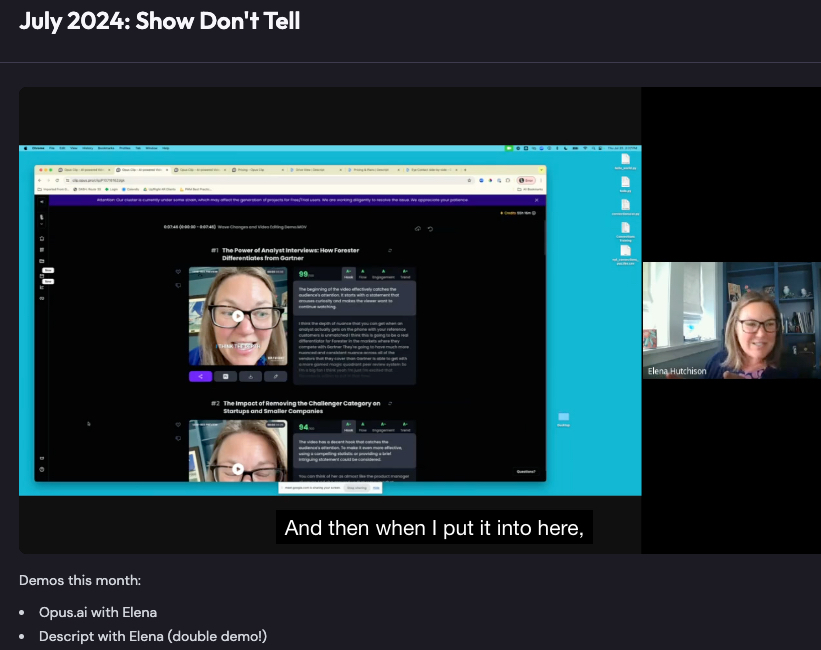
Opus.AI Workflow
Take a longer-form video podcast, feed it to Opus, and get back short-form clips that are scored for succinctness and virality potential — branded and ready to post on LinkedIn. It turns one piece of content into many without the hours of manual scrubbing and cutting.
Descript Workflow
Descript lets you edit video the way you'd edit a Google Doc. It transcribes your video, and then you delete words from the transcript and the video cuts itself. Highlight a sentence, hit delete, done. It completely changes who can edit video — you don't need to learn timeline-based editors anymore.
Context
Presented July 2024 at Women Defining AI's monthly Show Not Tell — a forum where members teach other members with actionable use cases and workflows. The whole point is showing, not just talking about, how you actually use these tools day to day.